Project Overview
Overview
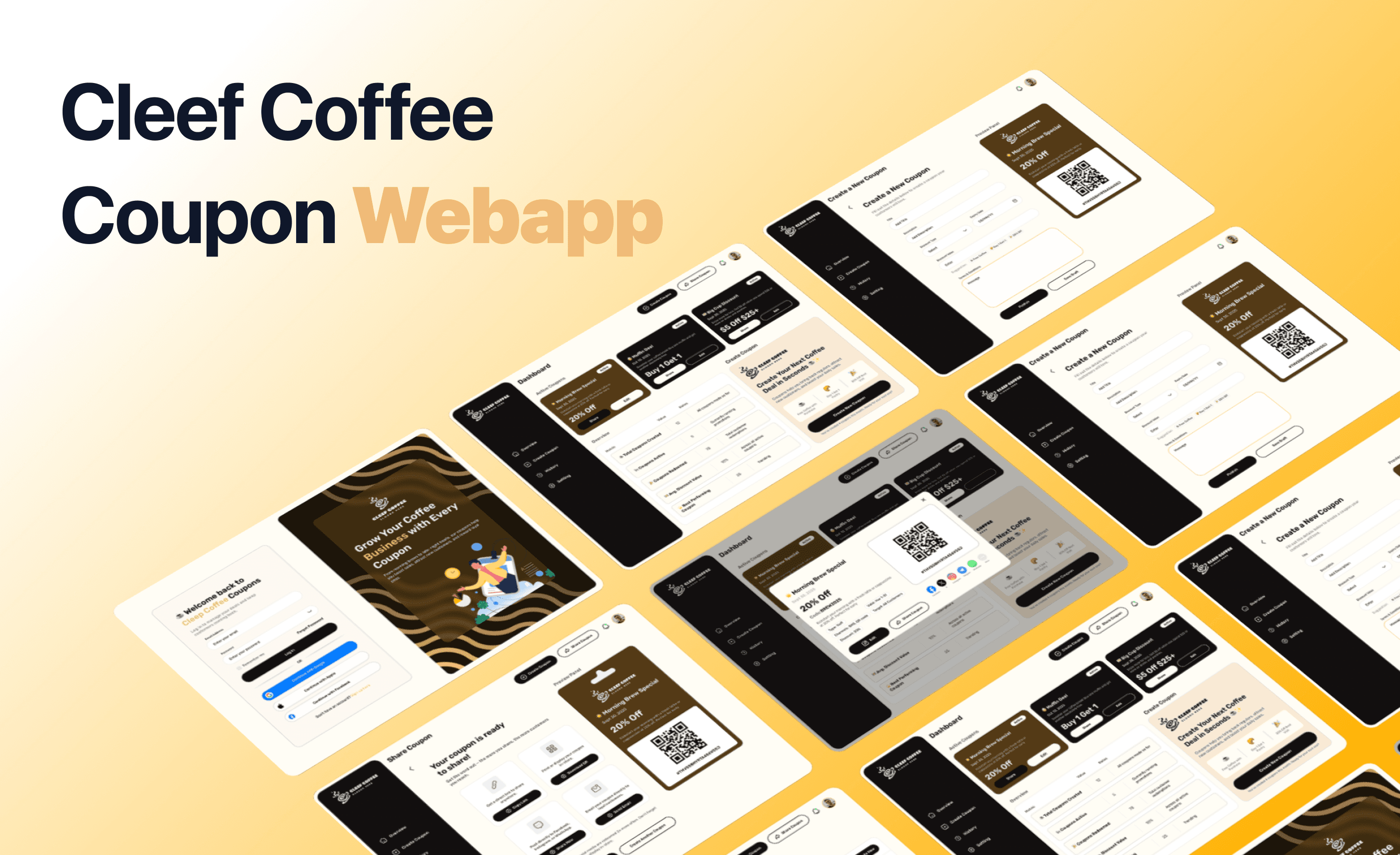
Cleef Coffee is a small, community-focused coffee business known for its warm atmosphere and fresh brews. To support its growth and customer engagement, Cleef Coffee launched a user-friendly web app that allows the business owner to easily create and share digital coupons. The platform is designed to help boost foot traffic, reward loyal customers, and simplify promotions—making marketing as smooth as their coffee.
Cleef Coffee is a small, community-focused coffee business known for its warm atmosphere and fresh brews. To support its growth and customer engagement, Cleef Coffee launched a user-friendly web app that allows the business owner to easily create and share digital coupons. The platform is designed to help boost foot traffic, reward loyal customers, and simplify promotions—making marketing as smooth as their coffee.
Role
Role
UI/UX Designer (Research) → Wireframes → UI → Testing)
UI/UX Designer (Research) → Wireframes → UI → Testing)
Tools
Tools
-Figma
-Slack
-Addobe Xd
-Figma
-Slack
-Addobe Xd
Duration
Duration
2 weeks
2 weeks
The Process
The Process
Problem Definition
Problem Definition
Problem Definition
Research & Insights
Research & Insights
Research & Insights
Solution Formula
Solution Formula
Solution Formula
Design Process
Design Process
Design Process
Prototype Testing
Prototype Testing
Prototype Testing
Final Outcome
Final Outcome
Final Outcome
The Process
Problem Statement
Problem Statement
Problem Statement
Background
Background
Small business owners often struggle with promoting deals and discounts in a simple, digital way. Many of them are not highly technical, so creating and sharing professional-looking coupons can feel intimidating.
This project explores a digital coupon web app designed specifically for small business owners. The goal is to make the process as smooth as possible: log in, create a coupon, preview it, and share it with customers in just a few clicks.
Small business owners often struggle with promoting deals and discounts in a simple, digital way. Many of them are not highly technical, so creating and sharing professional-looking coupons can feel intimidating.
This project explores a digital coupon web app designed specifically for small business owners. The goal is to make the process as smooth as possible: log in, create a coupon, preview it, and share it with customers in just a few clicks.
The Problem
The Problem
Local cafés, salons, and small shops rely on word of mouth or basic social media posts to attract customers. But designing a coupon that looks professional and distributing it effectively can be frustrating without the right tools.
Owners need a simple, step-by-step solution that removes the technical barriers while keeping things quick and efficient.
Local cafés, salons, and small shops rely on word of mouth or basic social media posts to attract customers. But designing a coupon that looks professional and distributing it effectively can be frustrating without the right tools.
Owners need a simple, step-by-step solution that removes the technical barriers while keeping things quick and efficient.
Who is Affected
Who is Affected
To guide the design, I made a few assumptions:
To guide the design, I made a few assumptions:
Type of business: Local cafés, beauty salons, and retail shops.
Type of business: Local cafés, beauty salons, and retail shops.
Technical literacy: Business owners are comfortable with basic apps like WhatsApp, Facebook, or email, but not with design or marketing tools.
Technical literacy: Business owners are comfortable with basic apps like WhatsApp, Facebook, or email, but not with design or marketing tools.
Distribution method: Most coupons will be shared digitally — through messaging apps, social media, or by generating a QR code that can be printed and placed in-store.
Distribution method: Most coupons will be shared digitally — through messaging apps, social media, or by generating a QR code that can be printed and placed in-store.
Research
Research
Research
Competitive Analysis
Competitive Analysis
I compared four competitor websites — looking at their target audience , strengths, weaknesses, and key features — to find gaps and opportunities.
I compared four competitor websites — looking at their target audience , strengths, weaknesses, and key features — to find gaps and opportunities.


Target audience
Target audience
Physical small businesses
Physical small businesses
Online stores
Online stores
Micro / budget businesses
Micro / budget businesses
Weaknesses
Costs can be high, and customization options are limited.
Costs can be high, and customization options are limited.
Shopify only
Shopify only
You have only basic control over design and layout.
You have only basic control over design and layout.
Strengths
Works with POS systems and updates automatically.
Works with POS systems and updates automatically.
Built-in tools make online promotions simple.
Built-in tools make online promotions simple.
Very easy to use, with a free option for beginners.
Very easy to use, with a free option for beginners.
Discount code easily
Discount code easily
Shareable link / QR code for coupon
Shareable link / QR code for coupon
Real-time analytics
Real-time analytics
Mobile / in-store friendly
Mobile / in-store friendly
Template offers for fast creation
Template offers for fast creation
low-setup for non-technical
low-setup for non-technical
Works offline
Works offline
Target audience
Physical small businesses
Online stores
Micro / budget businesses
Weaknesses
Costs can be high, and customization options are limited.
Shopify only
You have only basic control over design and layout.
Strengths
Works with POS systems and updates automatically.
Built-in tools make online promotions simple.
Very easy to use, with a free option for beginners.
Discount code easily
Shareable link / QR code for coupon
Real-time analytics
Mobile / in-store friendly
Template offers for fast creation
low-setup for non-technical
Works offline
User Interviews
User Interviews
Source
Owner 1: Sarah T., Owner of a local coffee shop, “Bean & Brew”
Owner 1: Sarah T., Owner of a local coffee shop, “Bean & Brew”
Owner 2: Daniel K., Owner of a small online handmade jewelry store, “SparkleCraft”
Owner 2: Daniel K., Owner of a small online handmade jewelry store, “SparkleCraft”
Key Questions
What was the main reason you decided to build a website for your business?
What was the main reason you decided to build a website for your business?
What challenges did you face while creating and managing your website?
What challenges did you face while creating and managing your website?
How does having a website impact your day-to-day business operations?
How does having a website impact your day-to-day business operations?
This is what I found
Owner 2 – Daniel K. (Jewelry Store)
Owner 2 – Daniel K. (Jewelry Store)
Needs an easy-to-manage online store with payment and inventory tracking.
Needs an easy-to-manage online store with payment and inventory tracking.
Wants professional-looking templates without hiring a designer.
Wants professional-looking templates without hiring a designer.
Finds analytics and sales tracking essential but overwhelming in complex platforms.
Finds analytics and sales tracking essential but overwhelming in complex platforms.
Owner 1 – Sarah T. (Coffee Shop)
Owner 1 – Sarah T. (Coffee Shop)
Wants a simple way to update menu, events, and announcements without needing a developer.
Wants a simple way to update menu, events, and announcements without needing a developer.
Finds current website editors confusing; wants drag-and-drop simplicity.
Finds current website editors confusing; wants drag-and-drop simplicity.
Values online ordering and booking tools for customers.
Values online ordering and booking tools for customers.
User Personas
User Personas

Daniel K.
Daniel K.
Age: 28
Age: 28
Status: Single
Status: Single
Occupation: Owner of an online
handmade jewelry store, “SparkleCraft”
Occupation: Owner of an online handmade jewelry store, “SparkleCraft”
Personality:
Personality:
Busy
Busy
ech-savvy
ech-savvy
Thinker
Thinker
Bio
Bio
“Daniel designs and sells jewelry online. He handles production, marketing, and website management alone. He values efficiency and sales growth but doesn’t have coding knowledge.”
Goals
Goals
Manage his online store with ease.
Manage his online store with ease.
Track sales, inventory, and customer behavior efficiently.
Track sales, inventory, and customer behavior efficiently.
Have a polished, professional website that builds customer trust.
Have a polished, professional website that builds customer trust.
Frustrations
Frustrations
E-commerce platforms with complicated settings are confusing.
E-commerce platforms with complicated settings are confusing.
Lacks time to troubleshoot technical issues.
Lacks time to troubleshoot technical issues.
Needs integrated analytics without extra apps.
Needs integrated analytics without extra apps.
Daniel K.
Age: 28
Status: Single
Occupation: Owner of an online handmade jewelry store, “SparkleCraft”
Personality:
Busy
ech-savvy
Thinker
Bio
“Daniel designs and sells jewelry online. He handles production, marketing, and website management alone. He values efficiency and sales growth but doesn’t have coding knowledge.”
Goals
Manage his online store with ease.
Track sales, inventory, and customer behavior efficiently.
Have a polished, professional website that builds customer trust.
Frustrations
E-commerce platforms with complicated settings are confusing.
Lacks time to troubleshoot technical issues.
Needs integrated analytics without extra apps.

Sarah T.
Sarah T.
Age: 32
Age: 32
Status: Married, mother of one
Status: Married, mother of one
Occupation: Owner of a local
coffee shop, “Bean & Brew”
Occupation: Owner of a local coffee shop, “Bean & Brew”
Personality:
Personality:
Caring
Caring
family-focused
family-focused
organized
organized
Bio
Bio
“Sarah runs a small coffee shop and handles most of the business operations herself. She is passionate about connecting with her community but has limited technical skills.”
Goals
Goals
Easily update her website with new menu items and events.
Easily update her website with new menu items and events.
Accept online orders and reservations.
Accept online orders and reservations.
Maintain a professional online presence without hiring a developer.
Maintain a professional online presence without hiring a developer.
Frustrations
Frustrations
Complex website editors are overwhelming.
Complex website editors are overwhelming.
Limited knowledge of web design and coding.
Limited knowledge of web design and coding.
Wants tools that don’t require constant learning or maintenance.
Wants tools that don’t require constant learning or maintenance.
Sarah T.
Age: 32
Status: Married, mother of one
Occupation: Owner of a local coffee shop, “Bean & Brew”
Personality:
Caring
family-focused
organized
Bio
“Sarah runs a small coffee shop and handles most of the business operations herself. She is passionate about connecting with her community but has limited technical skills.”
Goals
Easily update her website with new menu items and events.
Accept online orders and reservations.
Maintain a professional online presence without hiring a developer.
Frustrations
Complex website editors are overwhelming.
Limited knowledge of web design and coding.
Wants tools that don’t require constant learning or maintenance.
Define
Define
Define
Design Approach
Design Approach
My design choices were focused on clarity and simplicity.
My design choices were focused on clarity and simplicity.
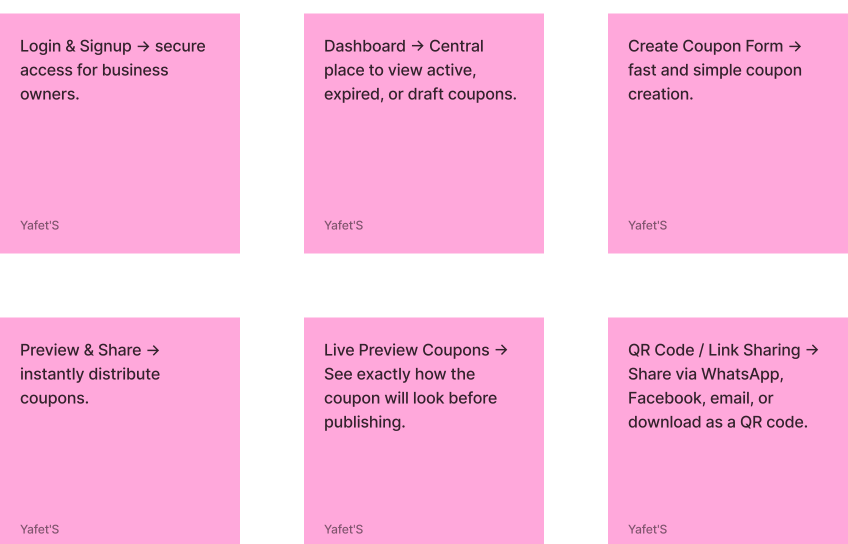
Keep forms short with only the essentials: coupon name, discount, expiration date.
Keep forms short with only the essentials: coupon name, discount, expiration date.
Use a clean dashboard that highlights the most important actions: Create Coupon and Share.
Use a clean dashboard that highlights the most important actions: Create Coupon and Share.
Provide immediate feedback with a live preview before sharing.
Provide immediate feedback with a live preview before sharing.
Offer one-click share options to the platforms owners already use daily.
Offer one-click share options to the platforms owners already use daily.
Key Features
Key Features
Checking Project Goals
Checking Project Goals
To create a successful product, we carefully analyze both user goals and business goals, then combine them into clear project goals. This ensures our design meets real user needs while supporting the business strategy.
To create a successful product, we carefully analyze both user goals and business goals, then combine them into clear project goals. This ensures our design meets real user needs while supporting the business strategy.
User Goals
User Goals
User Goals
Create coupons quickly
Create coupons quickly
Create coupons quickly
Track performance
Track performance
Track performance
Share easily
Share easily
Share easily
Look professional
Look professional
Look professional
Project Goals
Project Goals
Project Goals
Intuitive dashboard with “Create Coupon” CTA
Intuitive dashboard with “Create Coupon” CTA
Intuitive dashboard with “Create Coupon” CTA
Analytics dashboard (views, redemptions)
Analytics dashboard (views, redemptions)
Analytics dashboard (views, redemptions)
Built-in share options (link, QR, social media)
Built-in share options (link, QR, social media)
Built-in share options (link, QR, social media)
Pre-designed, customizable templates
Pre-designed, customizable templates
Pre-designed, customizable templates
Business Goals
Business Goals
Business Goals
Simplify coupon management
Simplify coupon management
Simplify coupon management
Collect business insights
Collect business insights
Collect business insights
Increase customer engagement
Increase customer engagement
Increase customer engagement
Build brand reputation
Build brand reputation
Build brand reputation
Problem statements & hypotheses
Problem statements & hypotheses
Based on interviews and research to understand the goals, needs and the pain points of the users.
Based on interviews and research to understand the goals, needs and the pain points of the users.
Small business owners struggle to promote their business effectively.
Small business owners struggle to promote their business effectively.
Small business owners struggle to promote their business effectively.
Existing digital tools are either too complex or not designed for local shops.
Existing digital tools are either too complex or not designed for local shops.
Existing digital tools are either too complex or not designed for local shops.
Owners lack visibility into what promotions work best.
Owners lack visibility into what promotions work best.
Owners lack visibility into what promotions work best.
Non-technical business owners need a simpler, guided flow.
Non-technical business owners need a simpler, guided flow.
Non-technical business owners need a simpler, guided flow.
If small business owners have a simple web app to create and share coupons, they’ll promote their business more frequently and effectively.
If small business owners have a simple web app to create and share coupons, they’ll promote their business more frequently and effectively.
If small business owners have a simple web app to create and share coupons, they’ll promote their business more frequently and effectively.
If the app includes visual templates and quick sharing options (WhatsApp, QR, link), owners will find it easier to reach customers.
If the app includes visual templates and quick sharing options (WhatsApp, QR, link), owners will find it easier to reach customers.
If the app includes visual templates and quick sharing options (WhatsApp, QR, link), owners will find it easier to reach customers.
If business owners can track coupon performance (views, redemptions, expirations), they will make better marketing decisions over time.
If business owners can track coupon performance (views, redemptions, expirations), they will make better marketing decisions over time.
If business owners can track coupon performance (views, redemptions, expirations), they will make better marketing decisions over time.
If the app is visually clean and intuitive, non-technical users will adopt it quickly without extra training.
If the app is visually clean and intuitive, non-technical users will adopt it quickly without extra training.
If the app is visually clean and intuitive, non-technical users will adopt it quickly without extra training.
Ideate
Ideate
Ideate
Information Architecture
Information Architecture
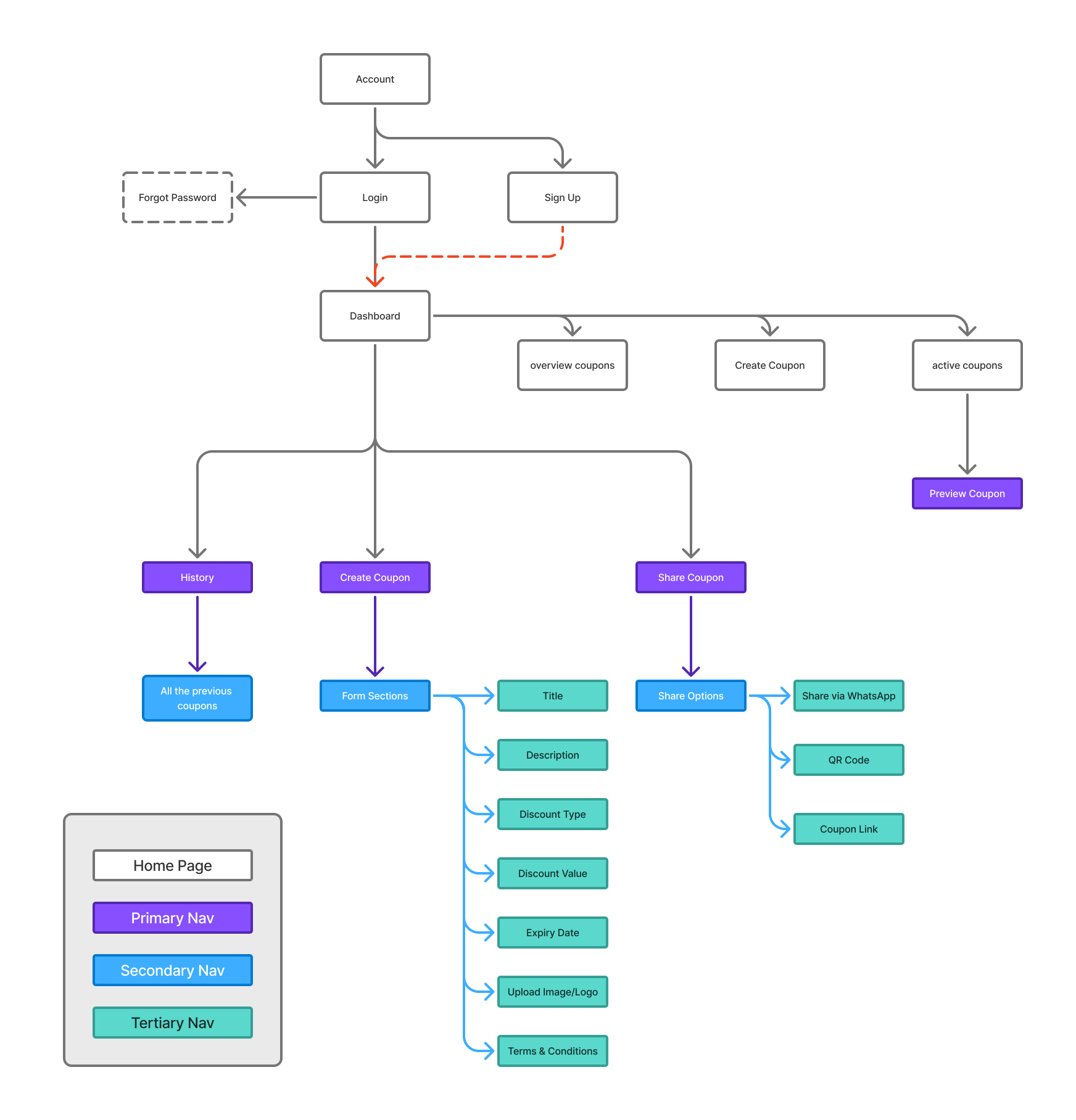
A simple structure designed for small business owners. From login to dashboard, users can easily create, share, and track coupons through four main pages — Overview, Create, Share, and History — all organized for quick access and clarity.
A simple structure designed for small business owners. From login to dashboard, users can easily create, share, and track coupons through four main pages — Overview, Create, Share, and History — all organized for quick access and clarity.
User Flow
User Flow
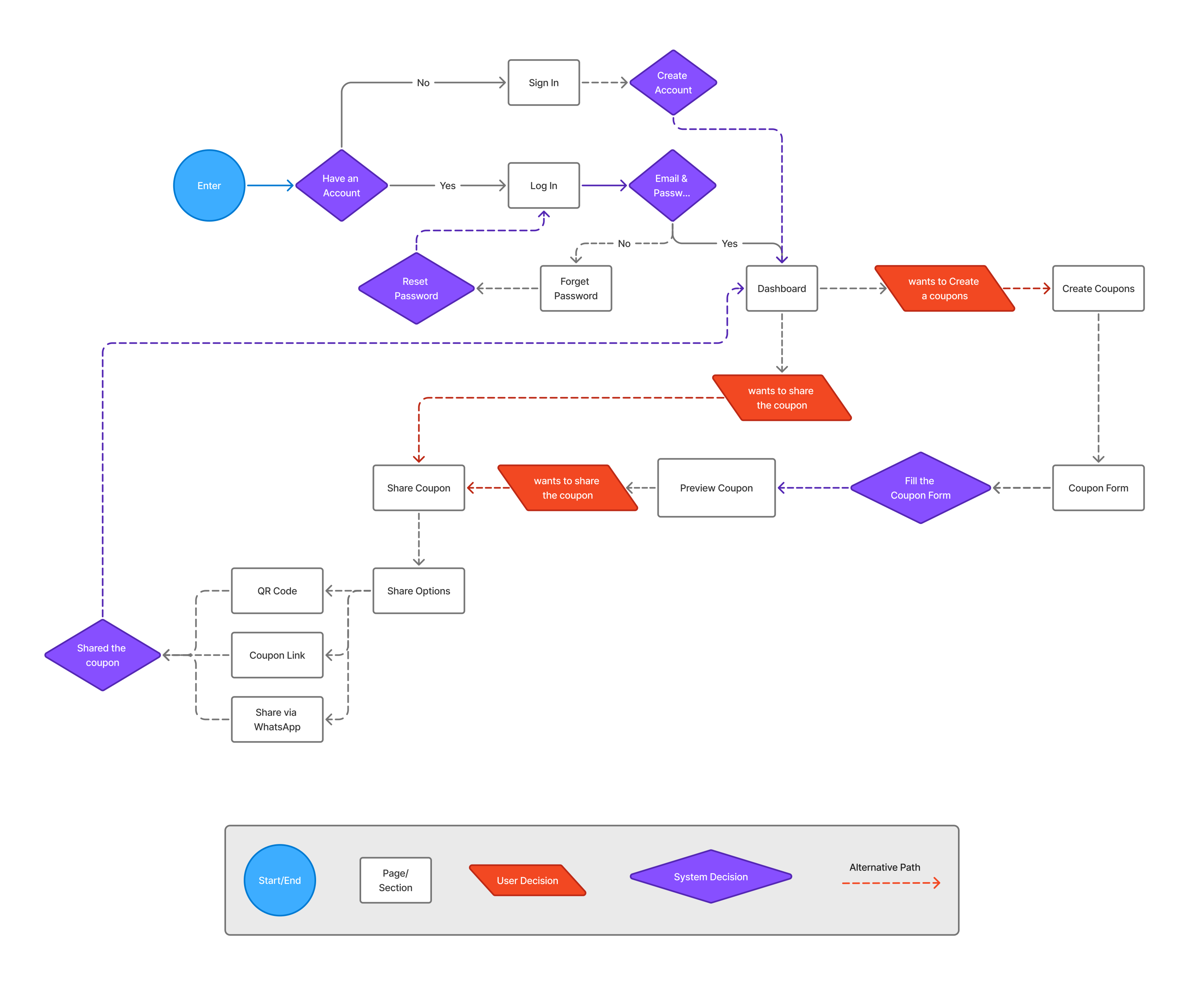
Users sign up or log in, create a coupon, preview it, then share it through multiple channels. Afterwards, they can track performance in Analytics and History — making the whole process fast, guided, and effortless.
Users sign up or log in, create a coupon, preview it, then share it through multiple channels. Afterwards, they can track performance in Analytics and History — making the whole process fast, guided, and effortless.
Wireframe
Wireframe
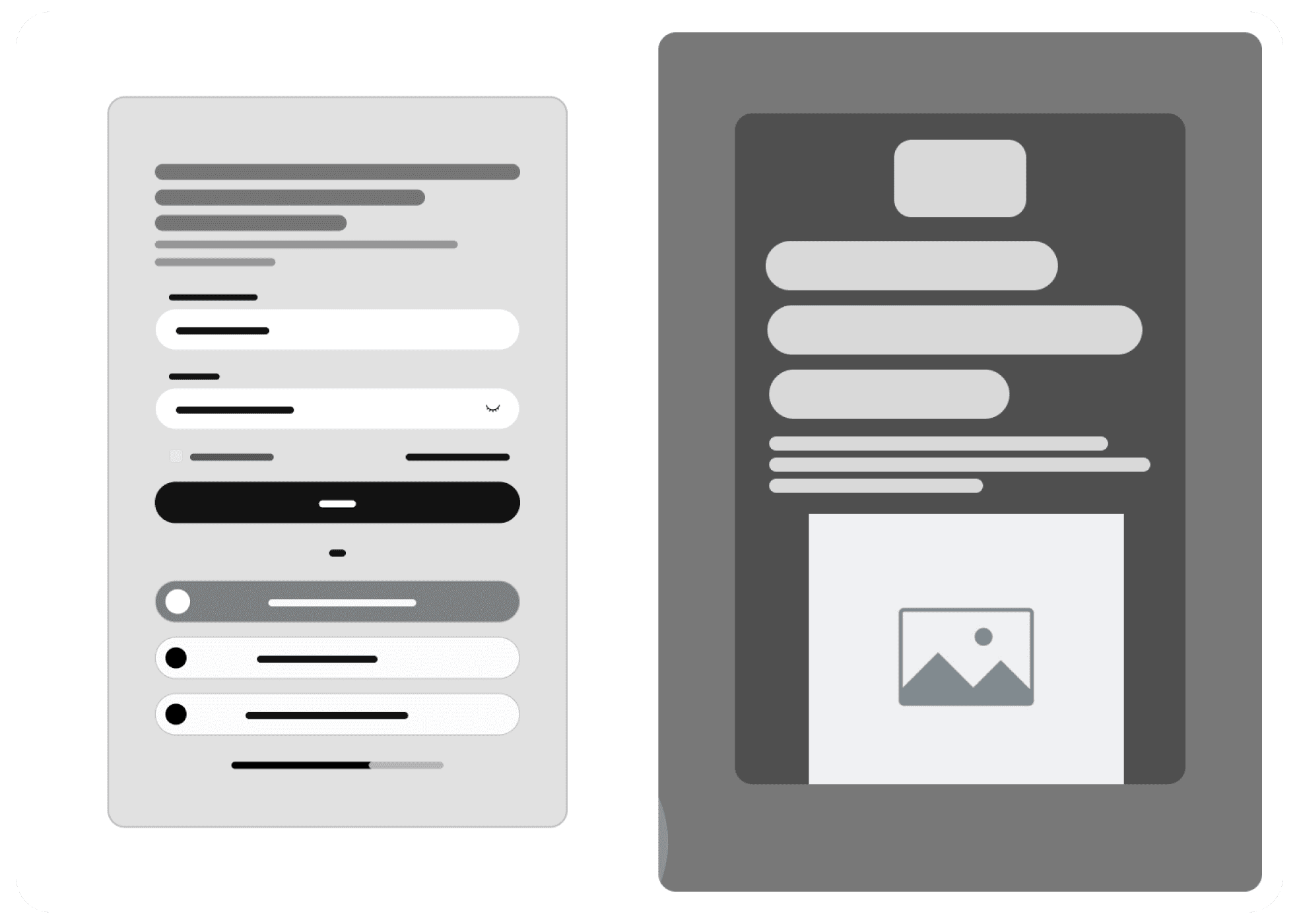
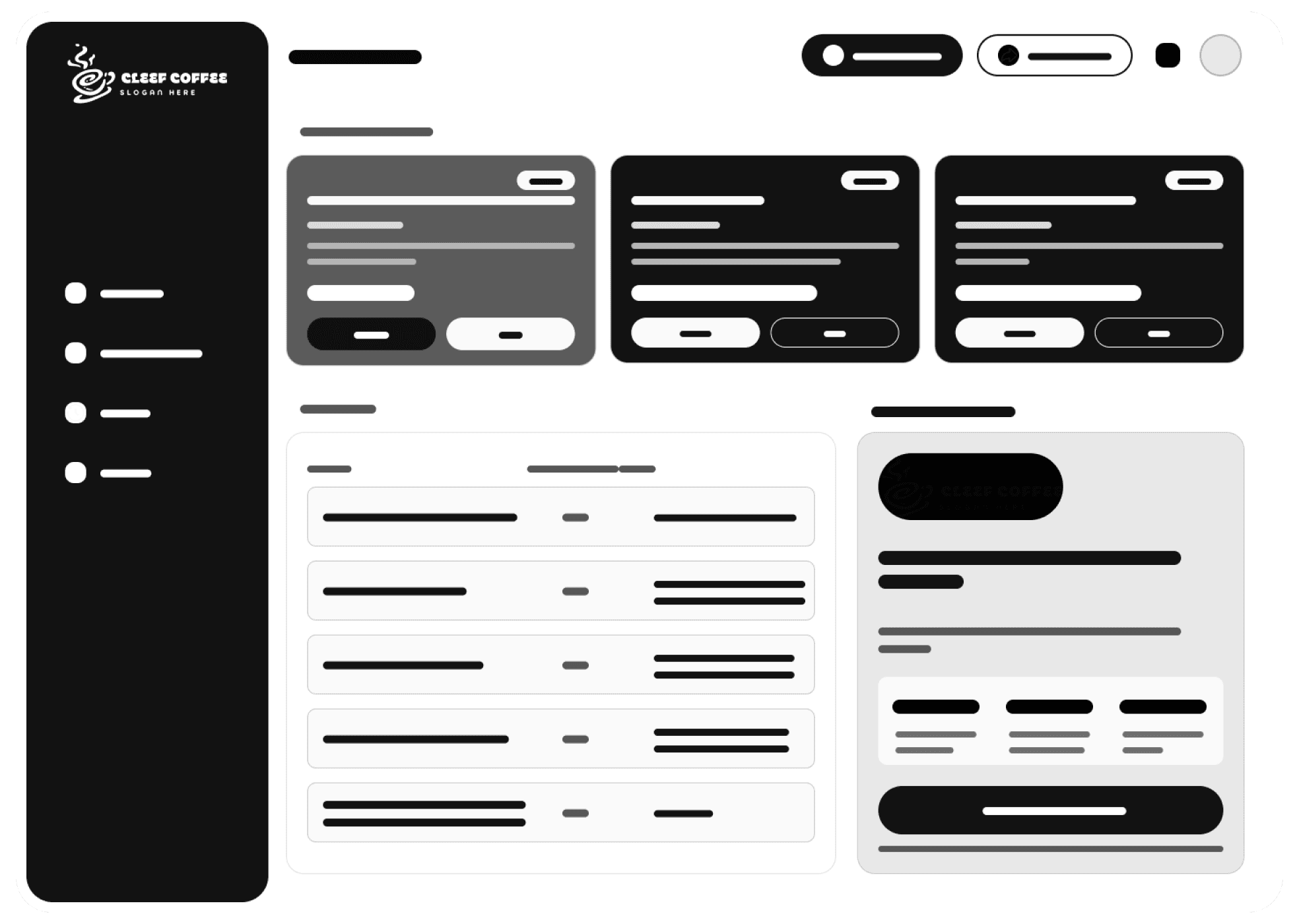
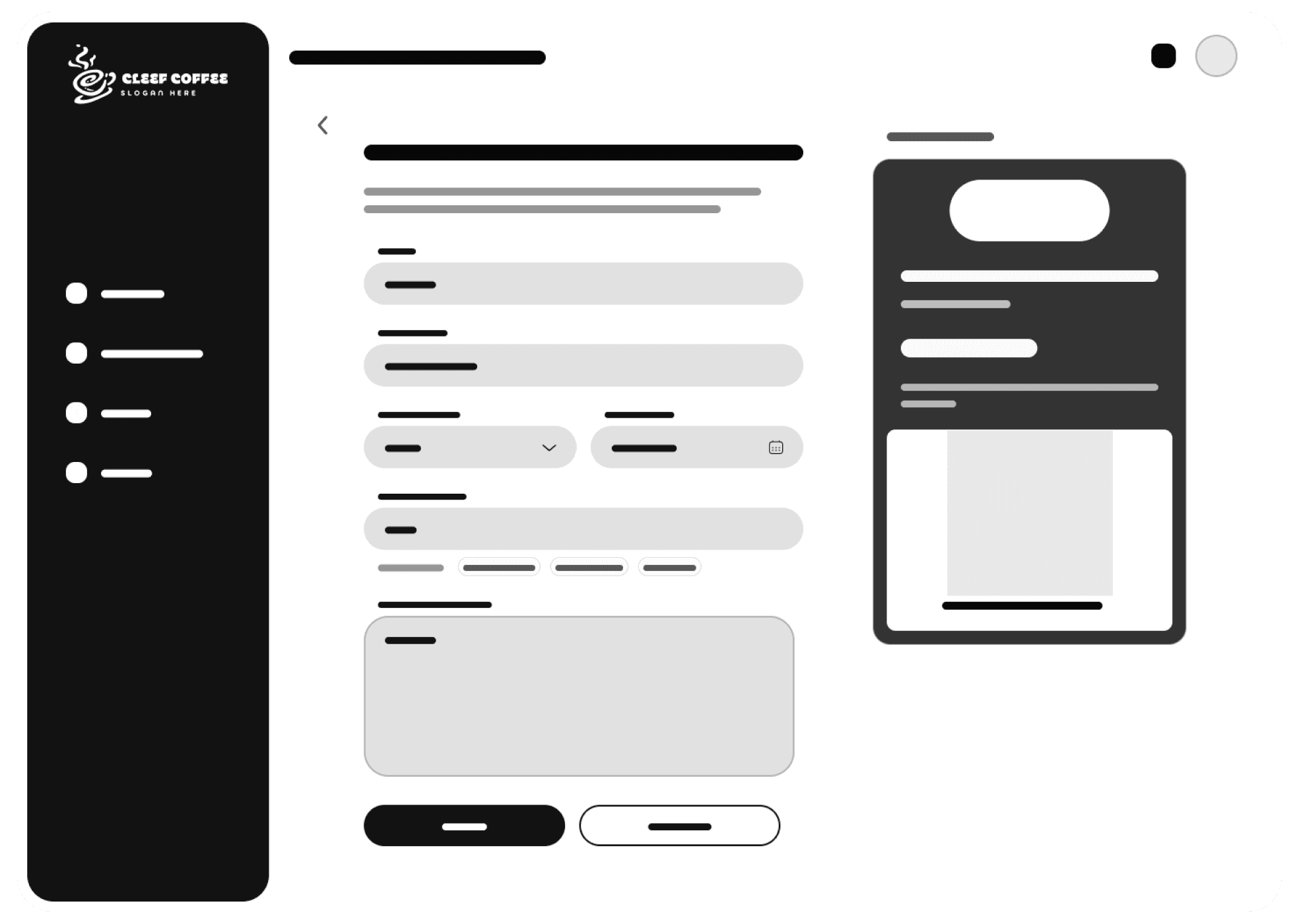
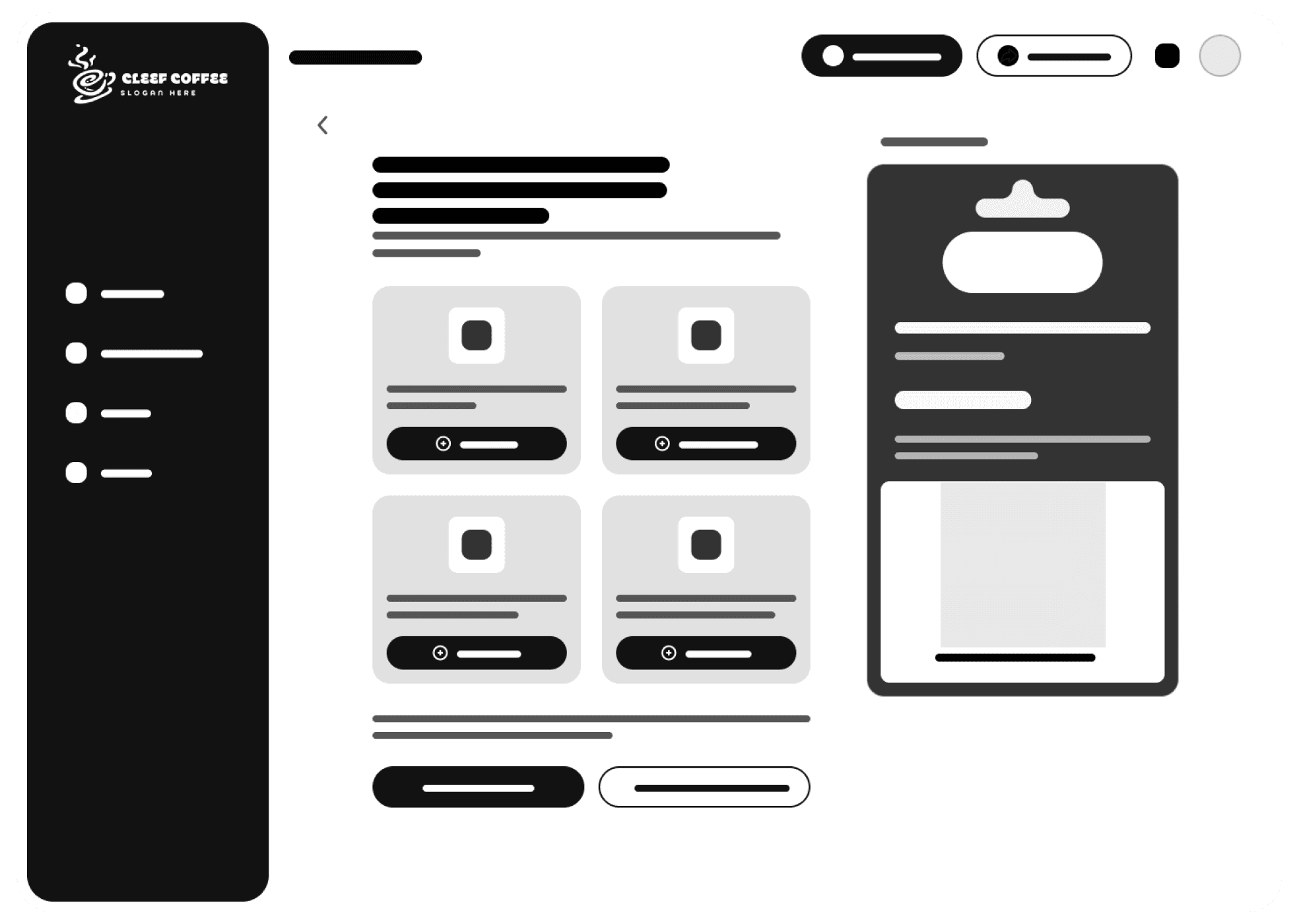
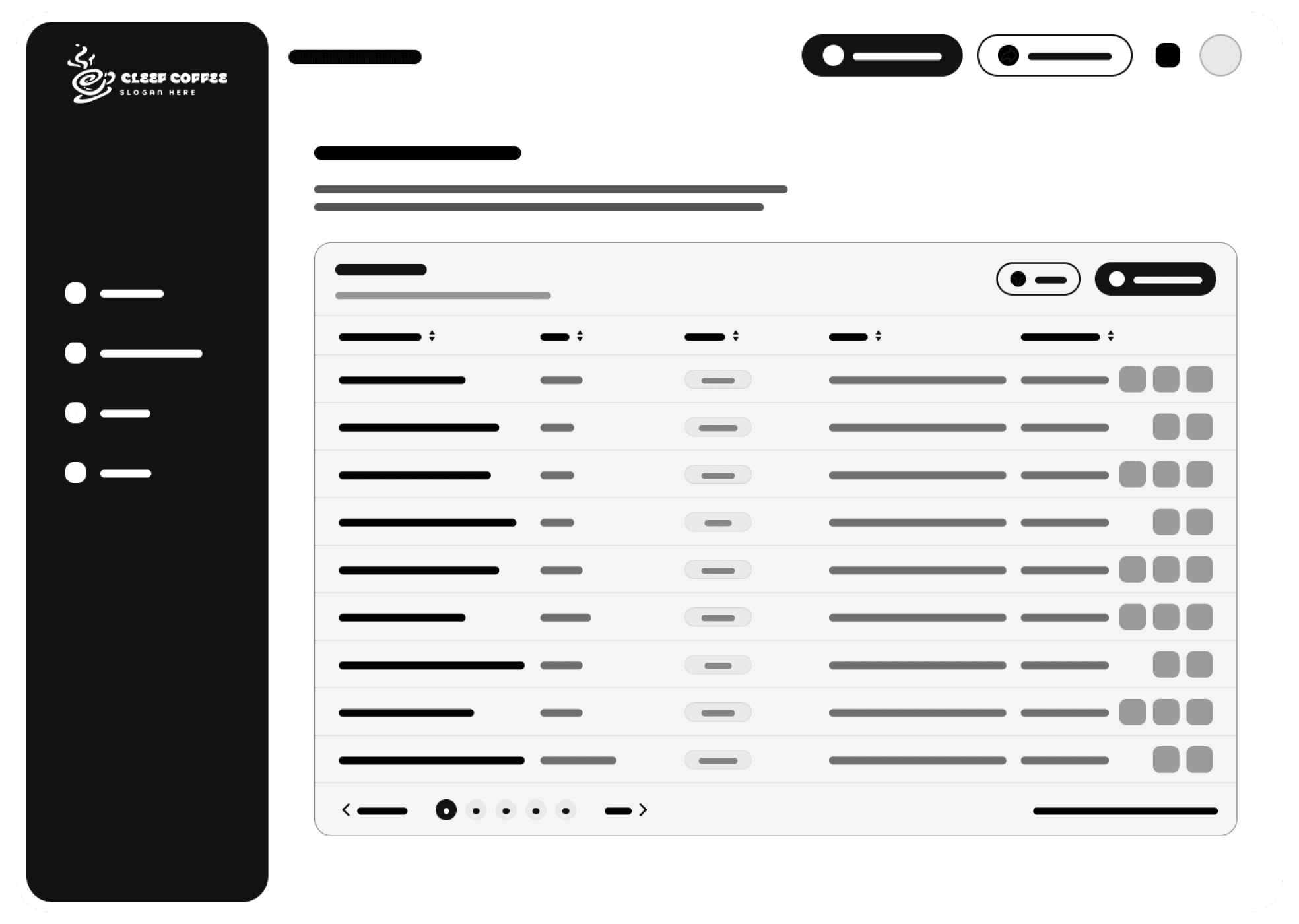
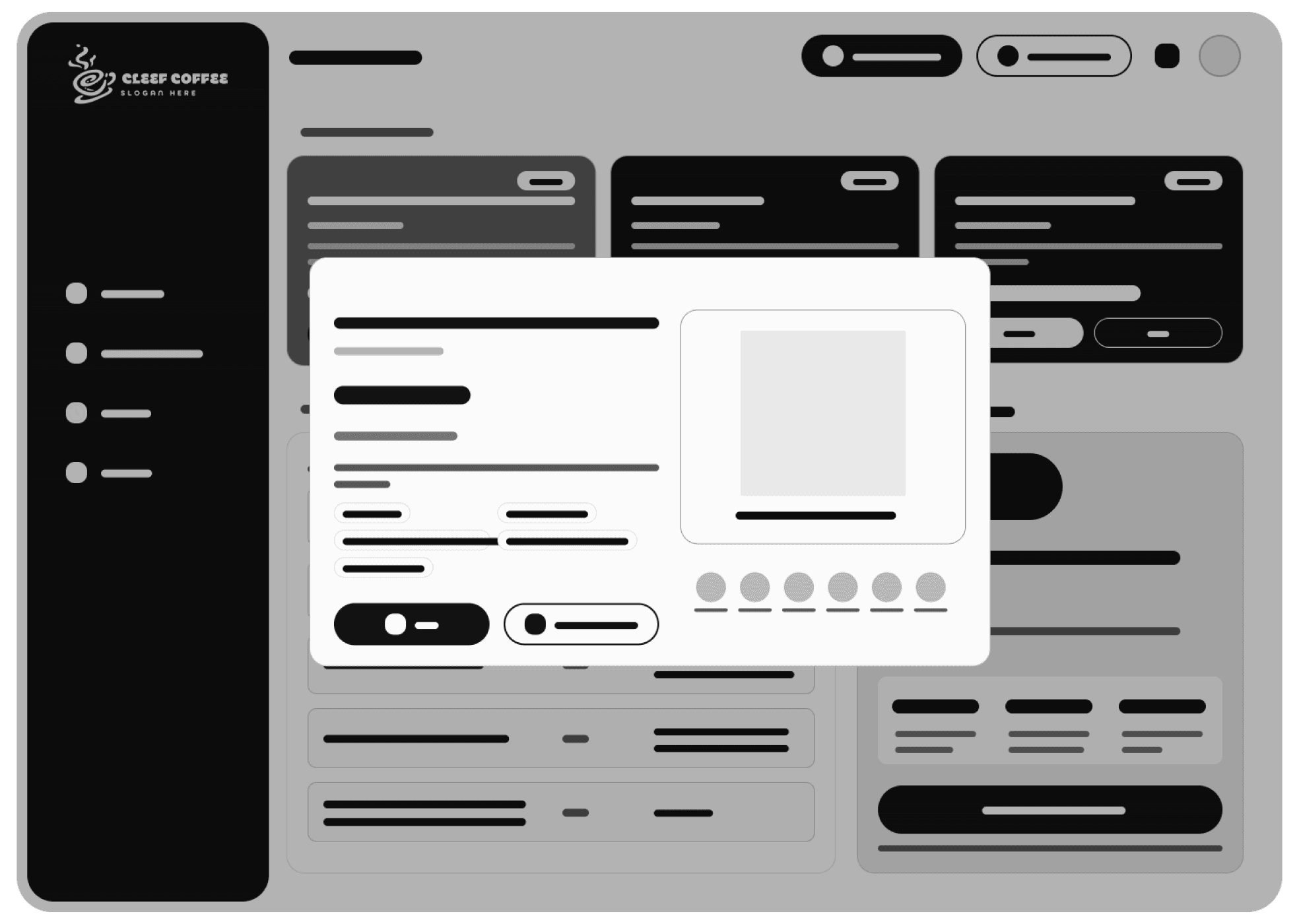
The wireframes outline the main user journey — from signing in to managing coupons. Each screen focuses on simplicity and function: a clean dashboard, clear form sections for creating coupons, easy sharing options, and a history view for tracking past coupons. The layout prioritizes usability, making it effortless for business owners to navigate and take action.
The wireframes outline the main user journey — from signing in to managing coupons. Each screen focuses on simplicity and function: a clean dashboard, clear form sections for creating coupons, easy sharing options, and a history view for tracking past coupons. The layout prioritizes usability, making it effortless for business owners to navigate and take action.
Layout Decision
Layout Decision
A brief overview of how each page’s layout was planned based on UX research, user behavior, and content priority. It explains why elements are placed where they are to improve clarity, flow, and usability.
A brief overview of how each page’s layout was planned based on UX research, user behavior, and content priority. It explains why elements are placed where they are to improve clarity, flow, and usability.
Log in Page
Sign in Page
Dashboard Page
Preview Coupon Page
Create Coupon Page
Share Coupon Page
Coupon History Page
Ui Design
Ui Design
Ui Design
Introduction
Introduction
The UI is built to feel warm, modern, and welcoming — reflecting the cozy vibe of a small coffee shop. The design uses soft tones, rounded components, and a simple, minimalist layout to help users quickly navigate and focus on actions like creating and sharing coupons.
The UI is built to feel warm, modern, and welcoming — reflecting the cozy vibe of a small coffee shop. The design uses soft tones, rounded components, and a simple, minimalist layout to help users quickly navigate and focus on actions like creating and sharing coupons.
Design System
Design System
Color palette
Color palette
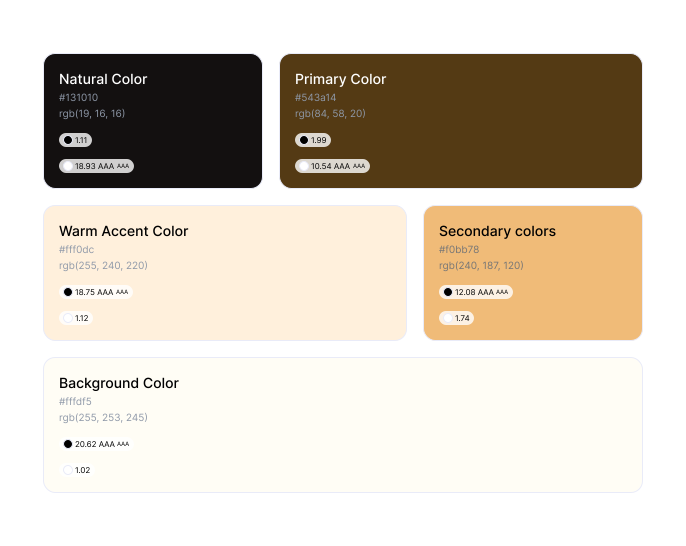
Instead of pure white, I chose a soft cream background to reduce harsh blue-light glare. The palette combines warm brown tones with coffee-inspired accents to make users feel the brand essence of a cozy café. This helps build emotional connection and visual consistency throughout the app.
Instead of pure white, I chose a soft cream background to reduce harsh blue-light glare. The palette combines warm brown tones with coffee-inspired accents to make users feel the brand essence of a cozy café. This helps build emotional connection and visual consistency throughout the app.
Typography
Typography
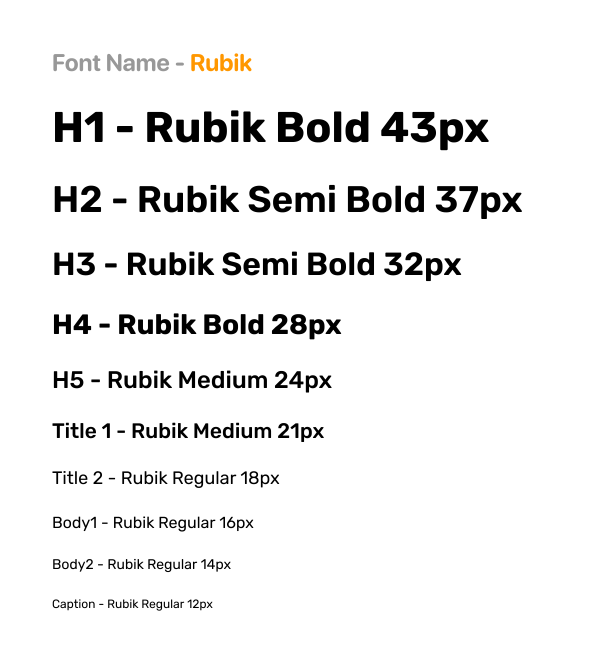
I used the "Rubik" font for its clean and approachable look. It feels friendly and modern, making it easier for business owners to read and interact with content without visual distraction.
I used the "Rubik" font for its clean and approachable look. It feels friendly and modern, making it easier for business owners to read and interact with content without visual distraction.
UI Elements
UI Elements
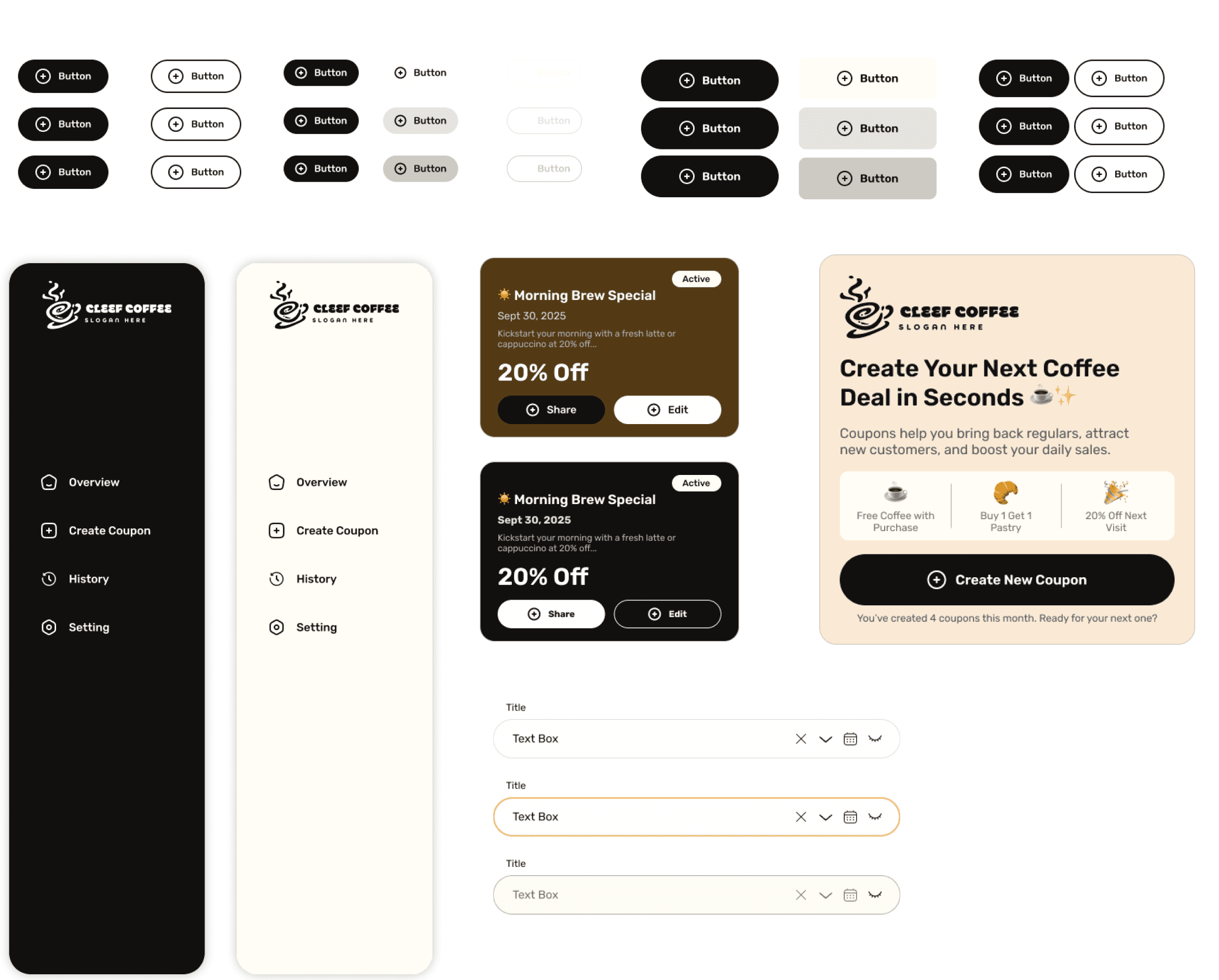
The UI elements are designed to feel intuitive and familiar — including clean buttons, sidebar navigation for quick access, and CTA sections that guide users toward key actions like creating or sharing coupons. The elements are consistent across the dashboard to keep interactions predictable and smooth.
The UI elements are designed to feel intuitive and familiar — including clean buttons, sidebar navigation for quick access, and CTA sections that guide users toward key actions like creating or sharing coupons. The elements are consistent across the dashboard to keep interactions predictable and smooth.
High-Fidelity Screens
High-Fidelity Screens
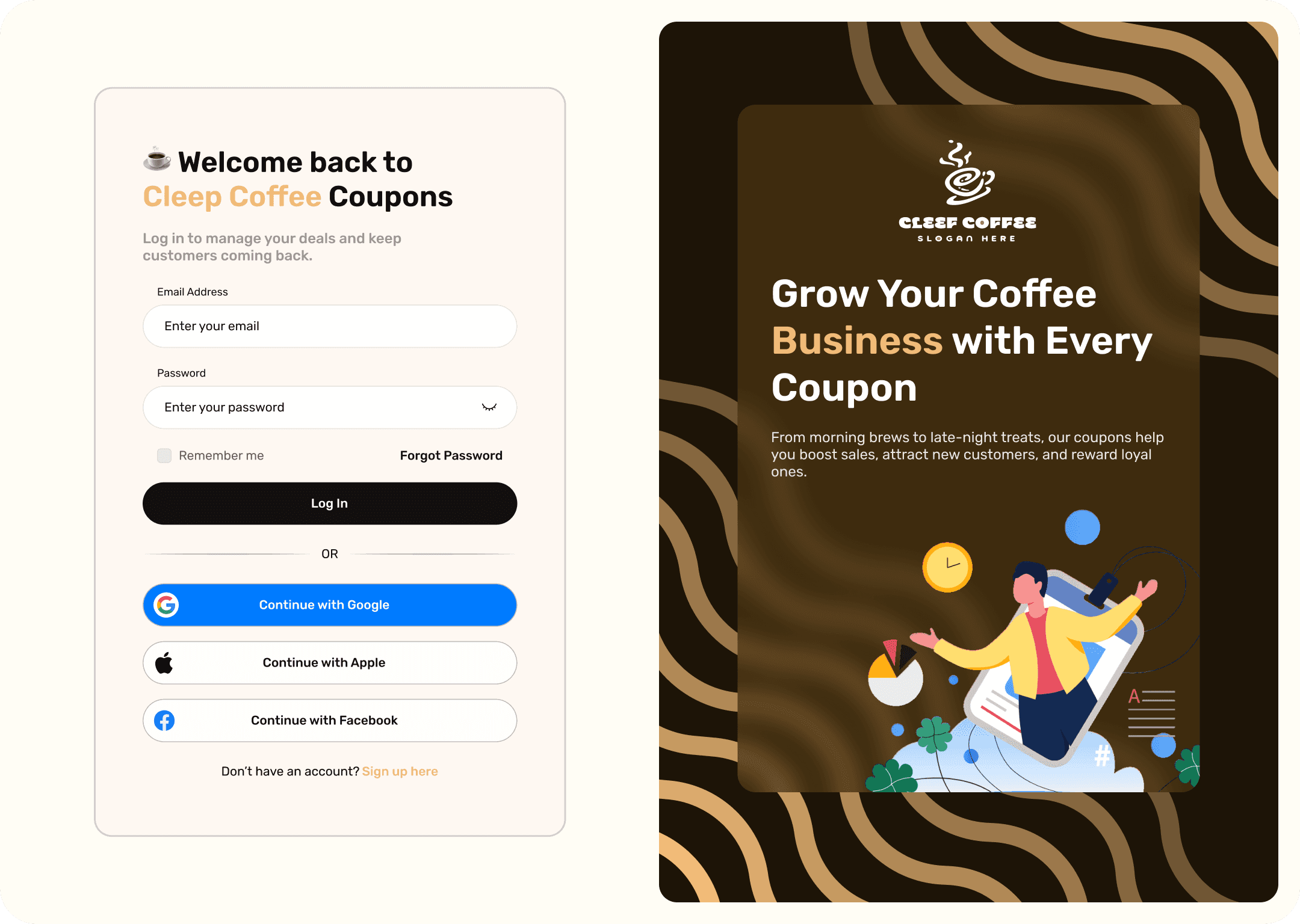
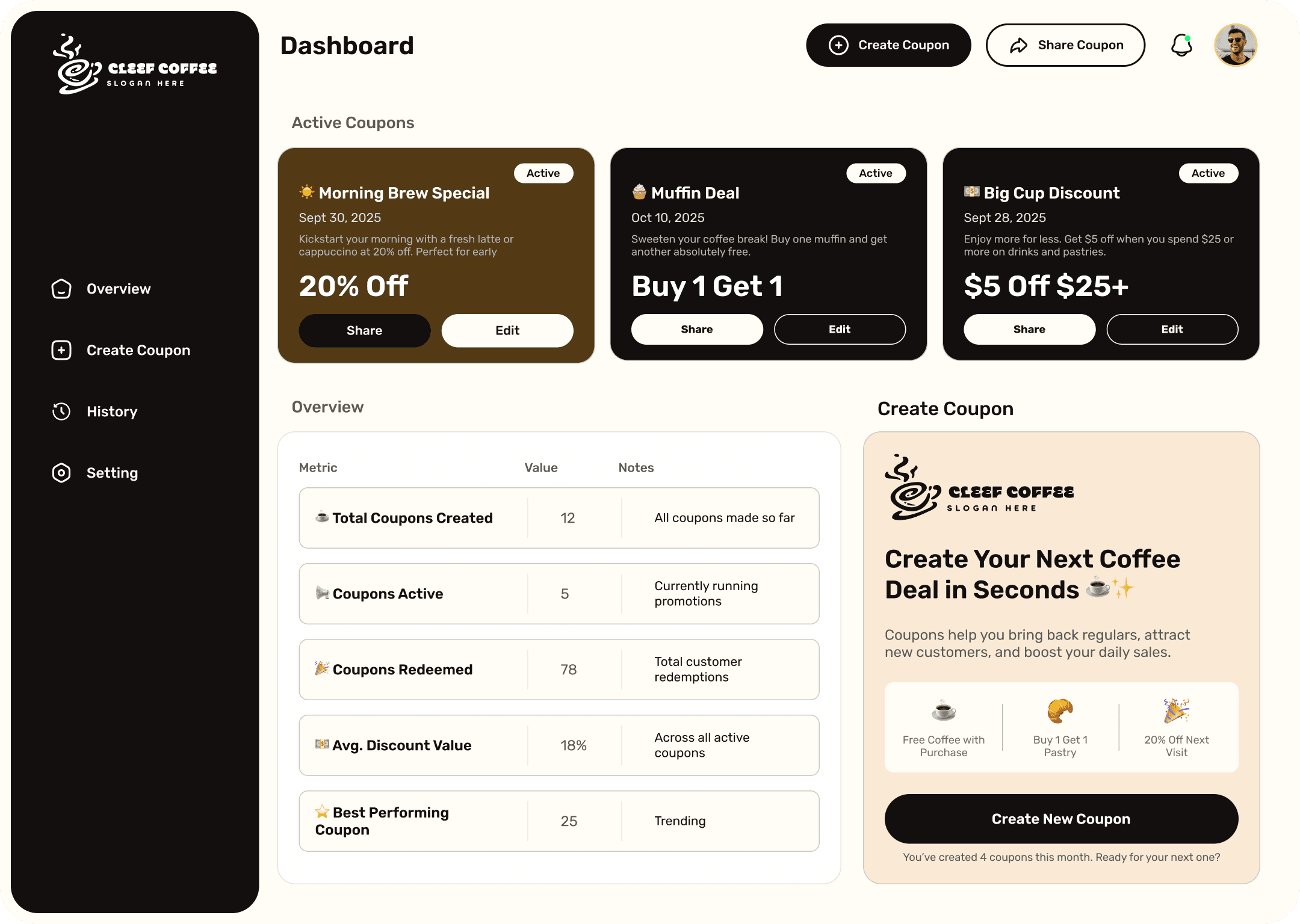
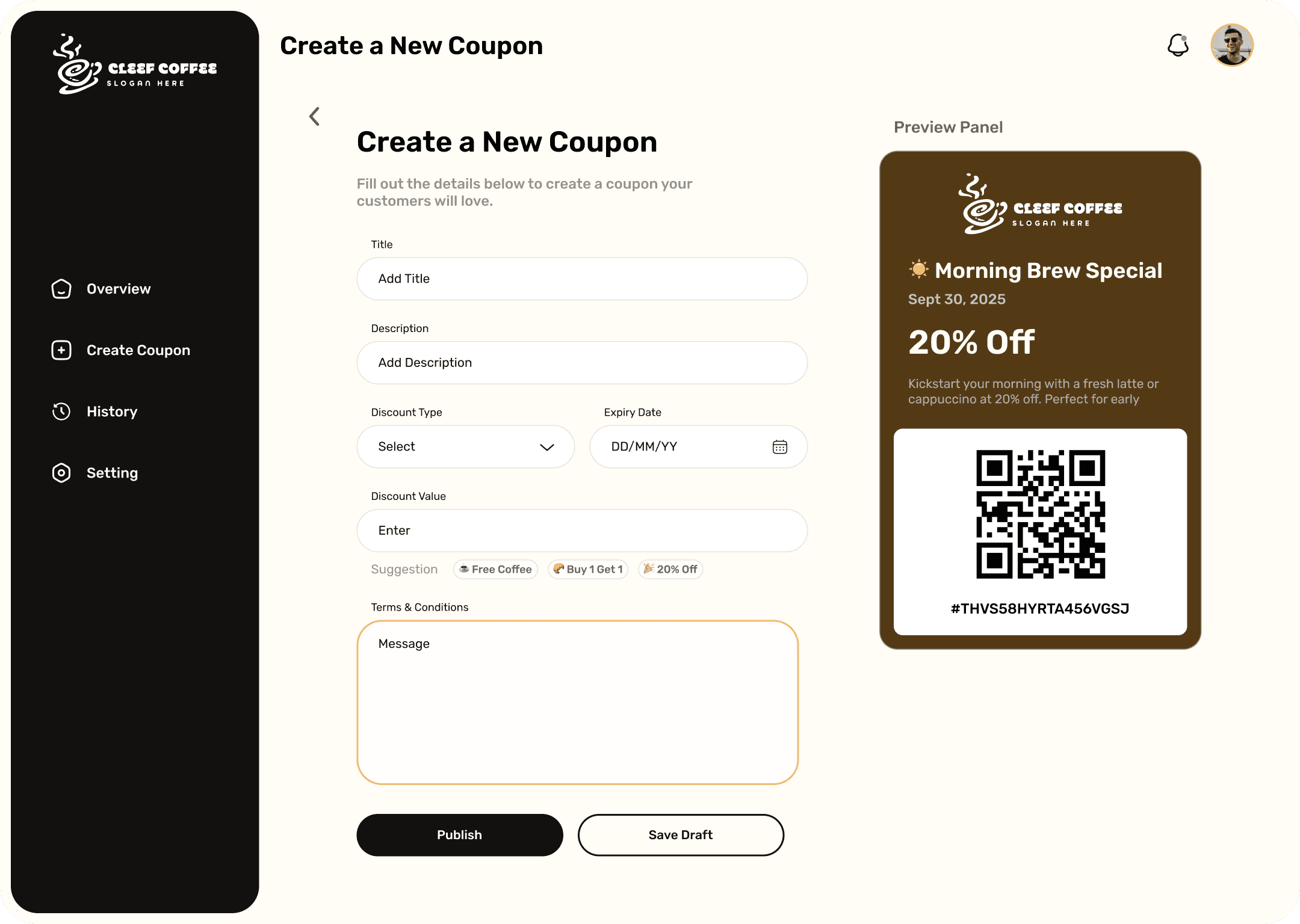
These screens represent the final visual design of the web app, combining both UI and UX decisions into a polished product. Each screen is crafted to guide coffee shop owners through a smooth and intuitive journey — from signing in to creating, sharing, and tracking coupons — with clean aesthetics, consistent components, and a clear emphasis on simplicity.
These screens represent the final visual design of the web app, combining both UI and UX decisions into a polished product. Each screen is crafted to guide coffee shop owners through a smooth and intuitive journey — from signing in to creating, sharing, and tracking coupons — with clean aesthetics, consistent components, and a clear emphasis on simplicity.
Log in : A simple and clean entry point for returning users to securely access their dashboard.
Log in : A simple and clean entry point for returning users to securely access their dashboard.
Sign in : A friendly sign-up screen designed to quickly onboard new business owners with minimal input.
Sign in : A friendly sign-up screen designed to quickly onboard new business owners with minimal input.
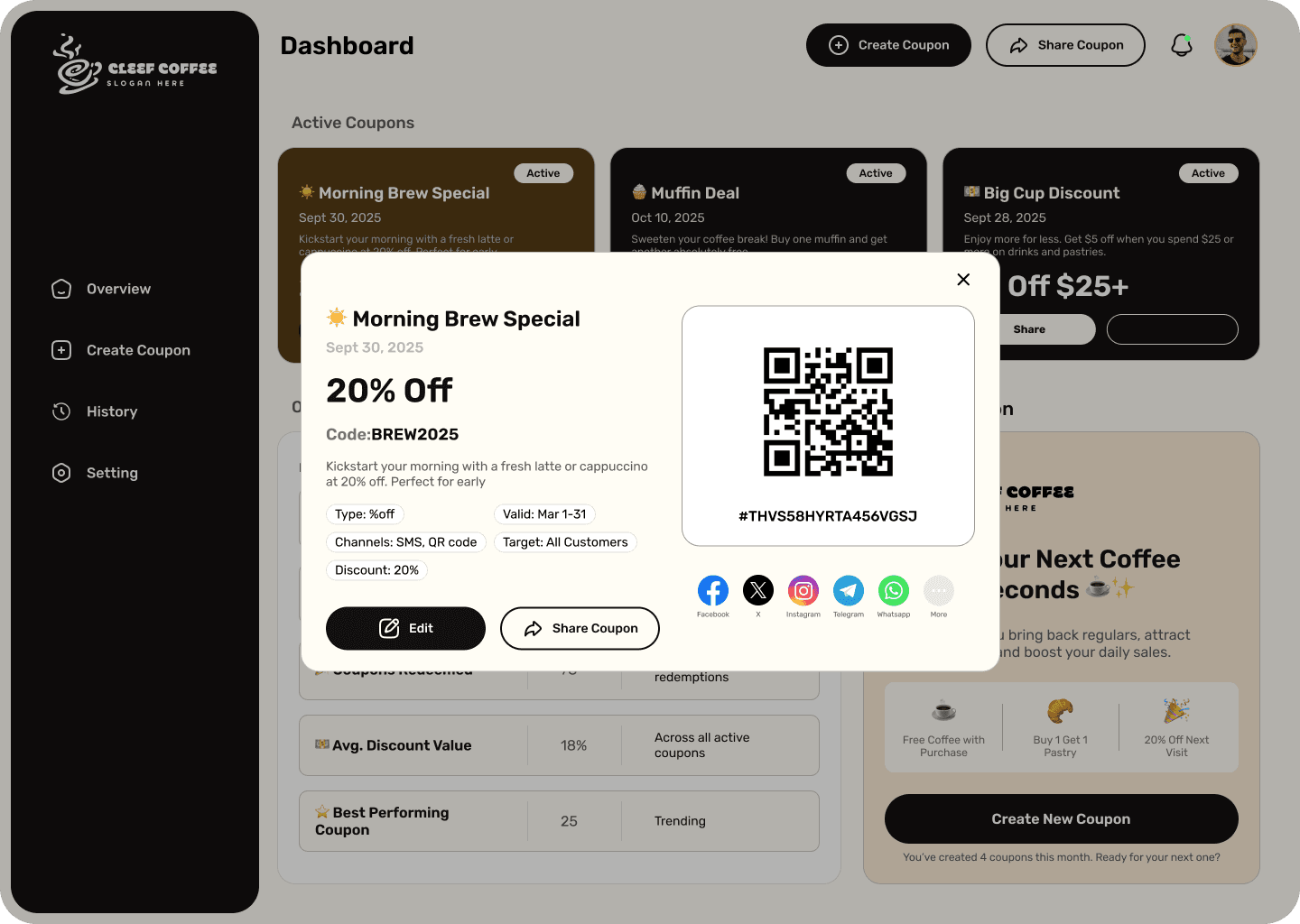
Dashboard: The central hub showing an overview of active coupons and key performance data.
Dashboard: The central hub showing an overview of active coupons and key performance data.
Create Coupon: A structured form that lets users add all necessary coupon details with templates and helpful guidance.
Create Coupon: A structured form that lets users add all necessary coupon details with templates and helpful guidance.
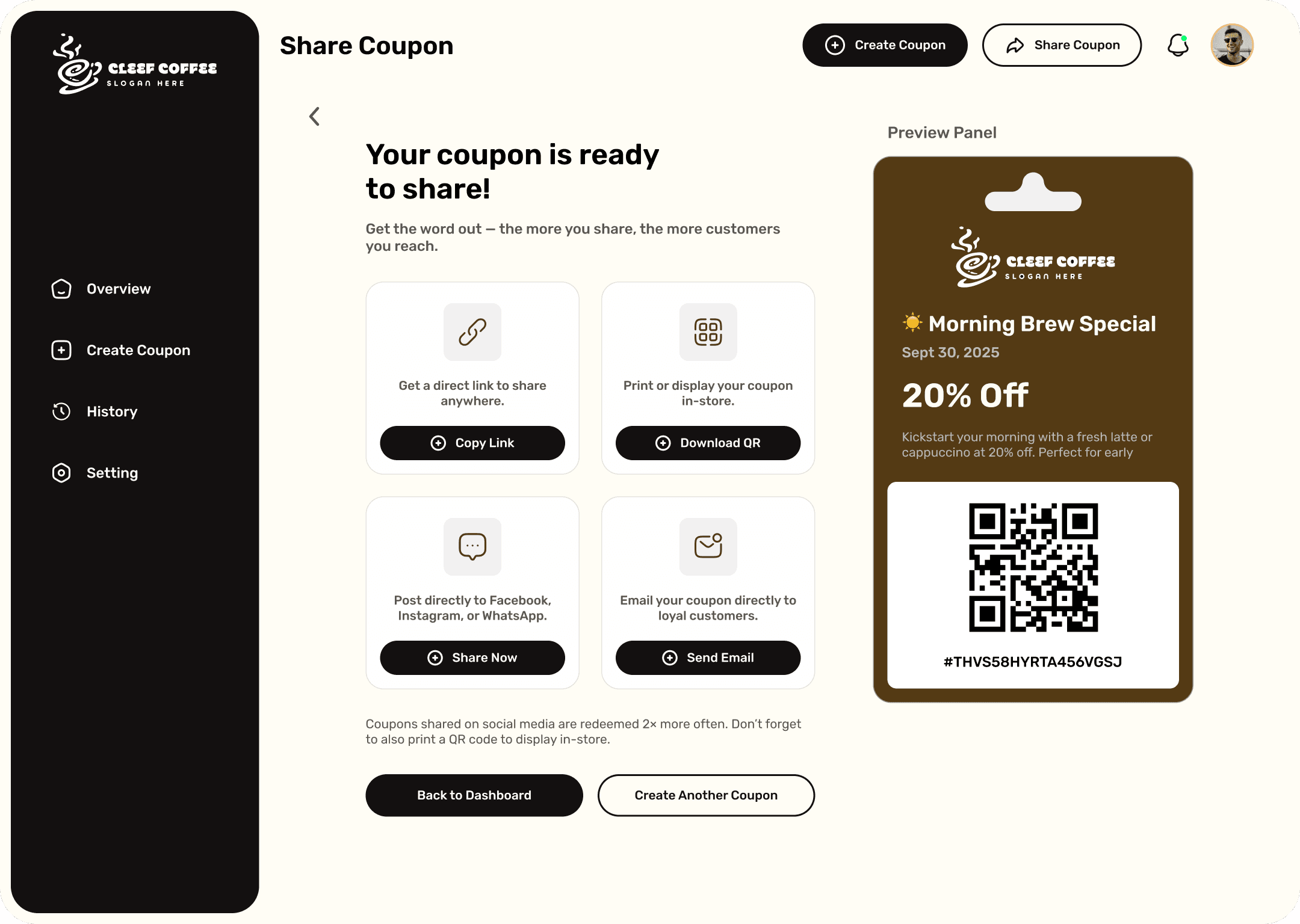
Share Coupon: Options to share coupons instantly via QR code, WhatsApp, or direct links — all in one place.
Share Coupon: Options to share coupons instantly via QR code, WhatsApp, or direct links — all in one place.
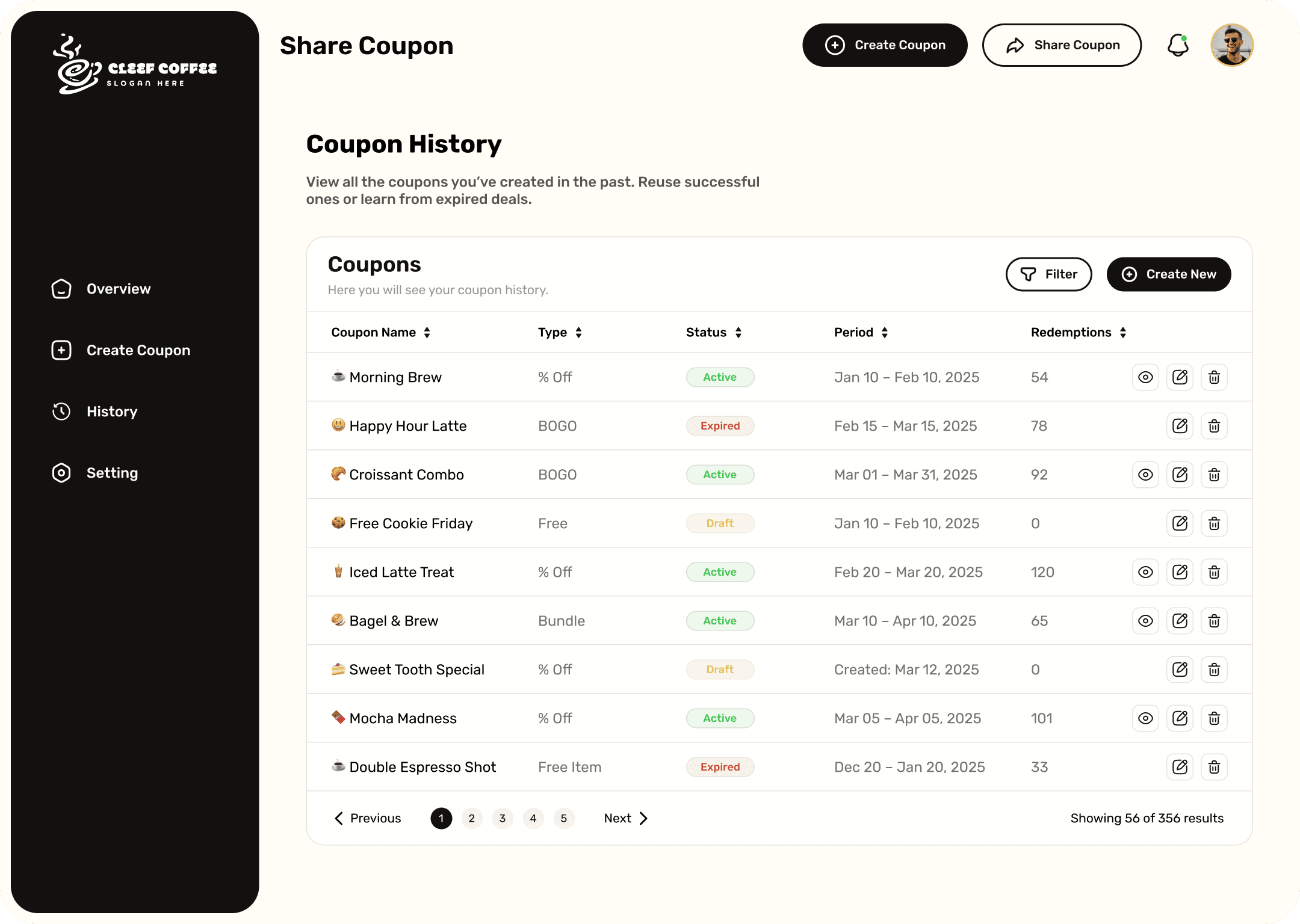
Coupon History: A record of all previously created coupons, so owners can easily track performance and reuse past ideas.
Coupon History: A record of all previously created coupons, so owners can easily track performance and reuse past ideas.
Usability Test
Usability Test
Usability Test
Objective
Objective
The primary objective of the usability test was to evaluate how easily small business owners — especially those with little technical experience — could navigate and accomplish key tasks within the app.
The focus was on three core actions:
The primary objective of the usability test was to evaluate how easily small business owners — especially those with little technical experience — could navigate and accomplish key tasks within the app.
The focus was on three core actions:
Creating a coupon
Creating a coupon
Sharing it with customers
Sharing it with customers
Understanding coupon performance from the dashboard
Understanding coupon performance from the dashboard
I wanted to uncover any usability issues, mental roadblocks, or overlooked obstacles that might prevent users from completing the flow smoothly and confidently.
I wanted to uncover any usability issues, mental roadblocks, or overlooked obstacles that might prevent users from completing the flow smoothly and confidently.
Methodology
Methodology
Participants: 5 users (coffee shop owners and small business operators)
Participants: 5 users (coffee shop owners and small business operators)
Testing Format: Remote moderated test using Figma prototype
Testing Format: Remote moderated test using Figma prototype
Tasks Given:
Tasks Given:
Log into the web app
Log into the web app
Create a 15% discount coupon
Create a 15% discount coupon
Share the coupon via a QR code
Share the coupon via a QR code
Check the analytics or coupon history
Check the analytics or coupon history
Evaluation Metrics:
Evaluation Metrics:
Evaluation Metrics:
Time taken to complete each task
Time taken to complete each task
Number of errors or times the participant hesitated
Number of errors or times the participant hesitated
Verbal feedback on clarity, interface comfort, and visual appeal
Verbal feedback on clarity, interface comfort, and visual appeal
Overall task success rate
Overall task success rate
Testing was conducted in a natural environment (using a laptop, at the participant’s own pace) to simulate a typical small business workflow.
Testing was conducted in a natural environment (using a laptop, at the participant’s own pace) to simulate a typical small business workflow.
Findings & Improvements
Findings & Improvements
Key Findings:
Key Findings:
3 out of 5 users didn’t immediately notice the “Create Coupon” button on the dashboard because it wasn’t visually distinct.
3 out of 5 users didn’t immediately notice the “Create Coupon” button on the dashboard because it wasn’t visually distinct.
2 users were unsure where to find coupon performance data for previously created coupons.
2 users were unsure where to find coupon performance data for previously created coupons.
All users mentioned enjoying the warm color palette but suggested that action buttons should stand out more.
All users mentioned enjoying the warm color palette but suggested that action buttons should stand out more.
Improvements Made:
Improvements Made:
Enlarged the primary CTA button and added a descriptive label (e.g. “+ Create New Coupon”).
Enlarged the primary CTA button and added a descriptive label (e.g. “+ Create New Coupon”).
Added a shortcut button for “History” on the dashboard to create faster access.
Added a shortcut button for “History” on the dashboard to create faster access.
Improved contrast between action buttons and the background to increase visibility.
Improved contrast between action buttons and the background to increase visibility.
Included step indicators and tooltips to add clarity during form completion.
Included step indicators and tooltips to add clarity during form completion.
Final Outcome
Final Outcome
Final Outcome
Final Outcome
Final Outcome
After several rounds of planning, designing, and refining, the coffee coupon web app evolved into a simple yet powerful tool for shop owners. The final design makes it easy to create, customize, and share coupons in just a few steps—all from a clean, intuitive dashboard. Built with the owner's needs in mind, the experience feels efficient and user-friendly, helping businesses grow customer loyalty without any extra effort.
After several rounds of planning, designing, and refining, the coffee coupon web app evolved into a simple yet powerful tool for shop owners. The final design makes it easy to create, customize, and share coupons in just a few steps—all from a clean, intuitive dashboard. Built with the owner's needs in mind, the experience feels efficient and user-friendly, helping businesses grow customer loyalty without any extra effort.
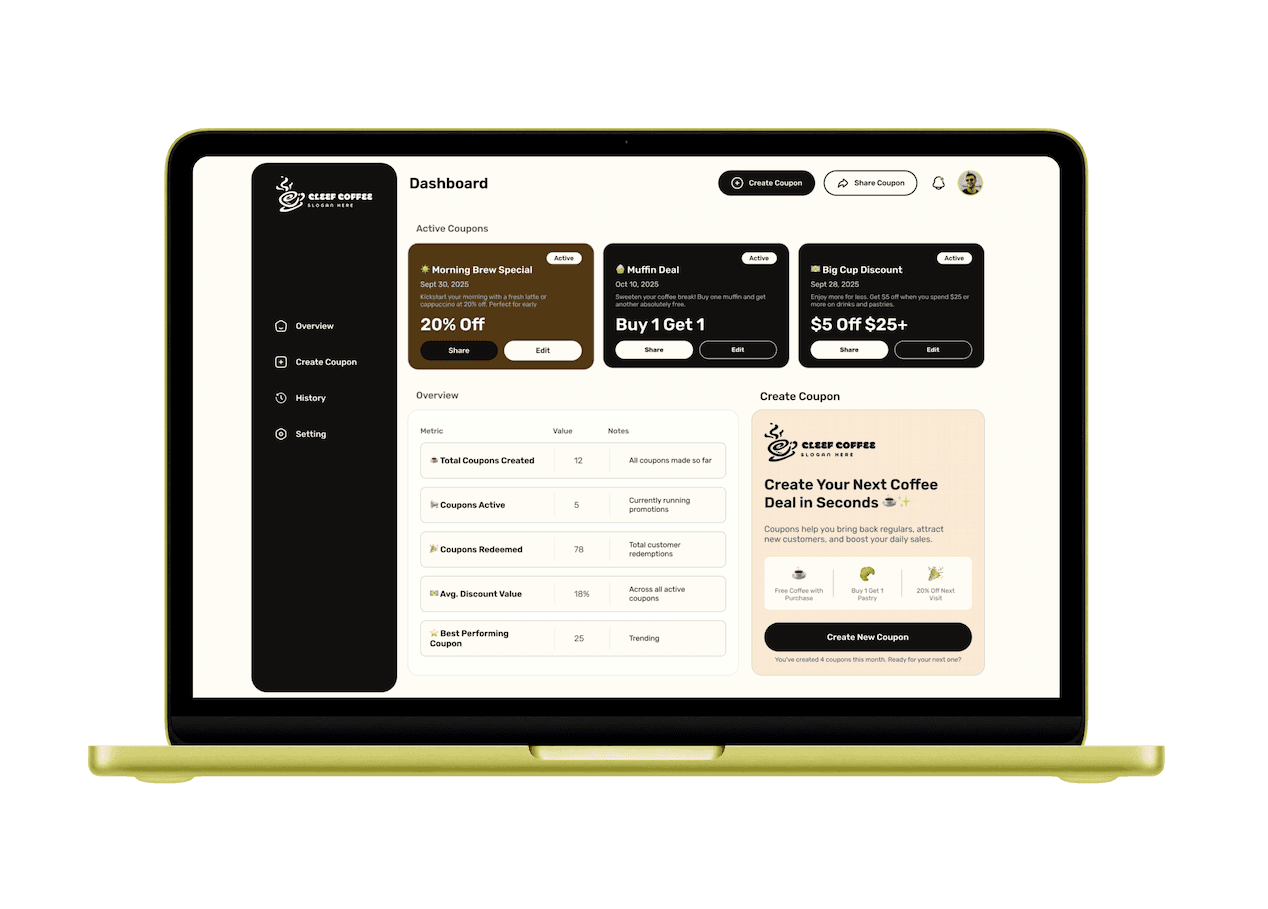
A clean and easy-to-navigate desktop design.
A clean and easy-to-navigate desktop design.
View Full Prototype
View Full Prototype